
Technical note
研发规约-Swagger服务契约
整合springfox
修改父pom
添加springfox的依赖:
<!-- swagger -->
<dependency>
    <groupId>io.springfox</groupId>
    <artifactId>springfox-swagger2</artifactId>
    <version>2.9.2</version>
</dependency>

<dependency>
    <groupId>io.springfox</groupId>
    <artifactId>springfox-swagger-ui</artifactId>
    <version>2.9.2</version>
</dependency>
增加spring配置
新增配置类SwaggerConfiguration.java
@EnableSwagger2
public class SwaggerConfiguration {
    @Bean
    public Docket getDocket() {
        return new Docket(DocumentationType.SWAGGER_2)
                .apiInfo(new ApiInfoBuilder()
                        .title("swagger-demo")
                        .description("demo")
                        .version("1.0.0")
                        .build())
                .select()
                .apis(RequestHandlerSelectors.any())
                .paths(PathSelectors.regex("/.*"))
                .build();
    }
}
相关路径
编码示例
Domain层
@ApiModel("附件信息")
public class Attachment {
    @ApiModelProperty(value = "附件ID", example = "1")
    private String id = PublicUtils.uuid();

    @ApiModelProperty(value = "附件名称", example = "1.docx")
    private String name;

    @ApiModelProperty(value = "附件类型", example = "text/plain")
    private String genre;

    @ApiModelProperty(value = "附件路径", example = "/tmp/1.docx")
    private String path;

    @ApiModelProperty(value = "附件大小", example = "100")
    private double size;
}
Controller层
@Api("附件管理")
@RestController
@RequestMapping("/attachment")
public class AttachmentController {
    @Autowired
    private AttachmentService service;

    @ApiOperation("保存附件")
    @PostMapping
    public RestResponse save(@ApiParam("附件信息") @RequestBody Attachment attachment) {
        service.save(attachment);
        return RestResponse.result(attachment);
    }

    @ApiOperation("删除附件")
    @DeleteMapping("/{id}")
    public RestResponse delete(@ApiParam(value = "附件ID", example = "1") @PathVariable String id) {
        service.delete(id);
        return RestResponse.result(id);
    }

    @ApiOperation("查询附件")
    @GetMapping
    public RestResponse query(@ApiParam(value = "附件名称", example = "1.docx") @RequestParam(required = false) String name,
                              @ApiParam(value = "页数", example = "1") @RequestParam(required = false, defaultValue = "0") int pageNum,
                              @ApiParam(value = "每页条数", example = "10") @RequestParam(required = false, defaultValue = "10") int pageSize) {
        PageInfo<Attachment> page = service.query(name, pageNum, pageSize);
        return RestResponse.result(page);
    }
}
注意事项
- 常用注解有
@Api,@ApiOperation,@ApiParam,@ApiModelProperty @Produces,@ApiResponses受制于框架暂不使用,接口风格尽量向rest靠拢- 尽量在注解中添加example属性,以方便后期在swagger-ui中做手工接口测试
- 注解在一定程度上可以替代
/**/注释,具体看公司要求
swagge-ui
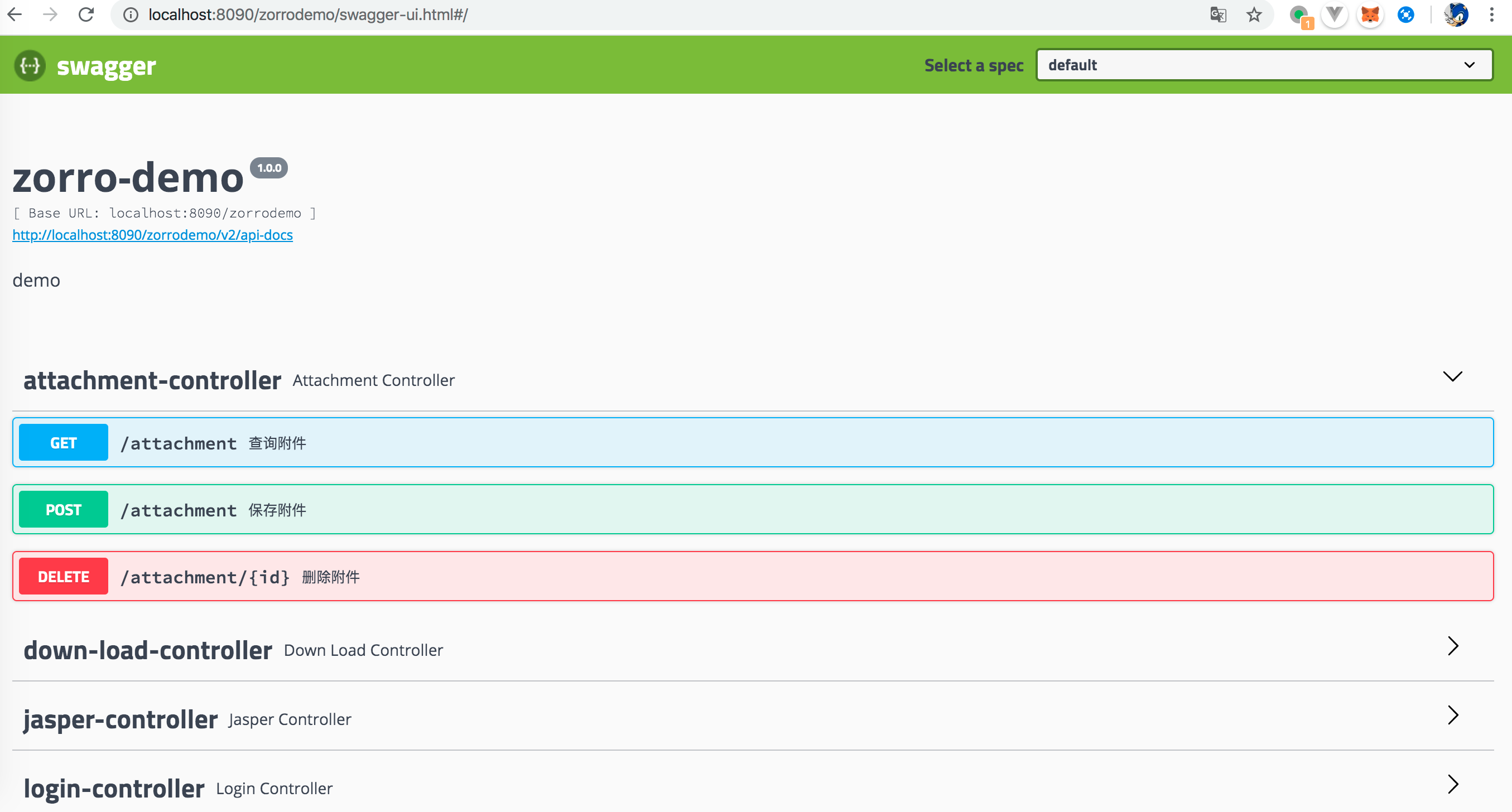
查看API信息
浏览器访问http://localhost:8090/zorrodemo/swagger-ui.html,打开swagger-ui的界面,可查看所有API的信息
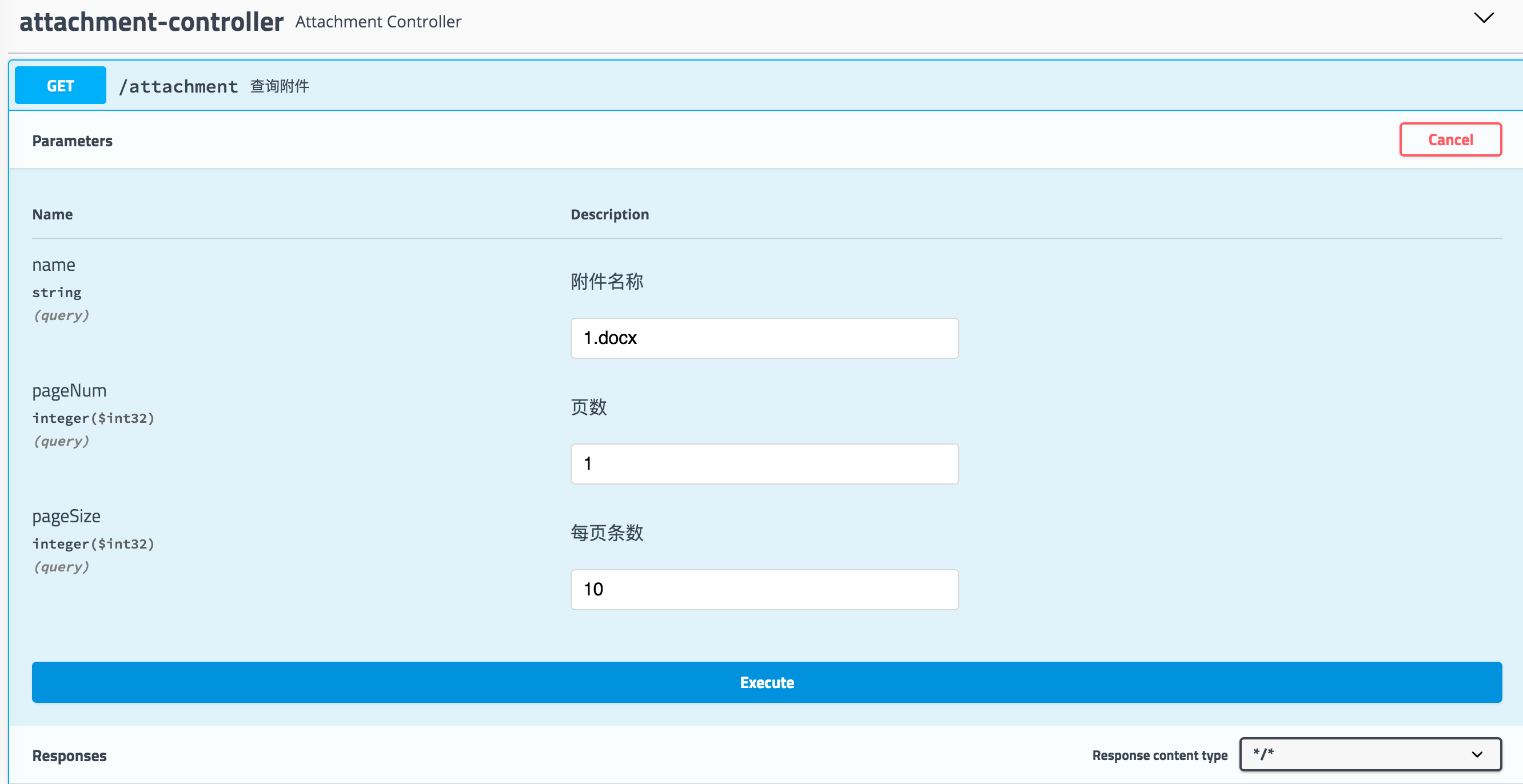
API测试验证
点击Try it out按钮,可对单个接口手工进行测试
文档生成
- 通过swagger的原始描述json,可以使用各种工具生成多种格式的API文档(asciidoc/pdf/html/markdonwn)
- json api-docs的路径为: http://localhost:8090/zorrodemo/v2/api-docs
- 建议使用swagger-markdown工具生成markdown格式文档,方便后期格式转换、导出
介绍页面:
https://www.npmjs.com/package/swagger-markdown
安装及使用:
npm install -g swagger-markdown
swagger-markdown -i ./api-docs.json